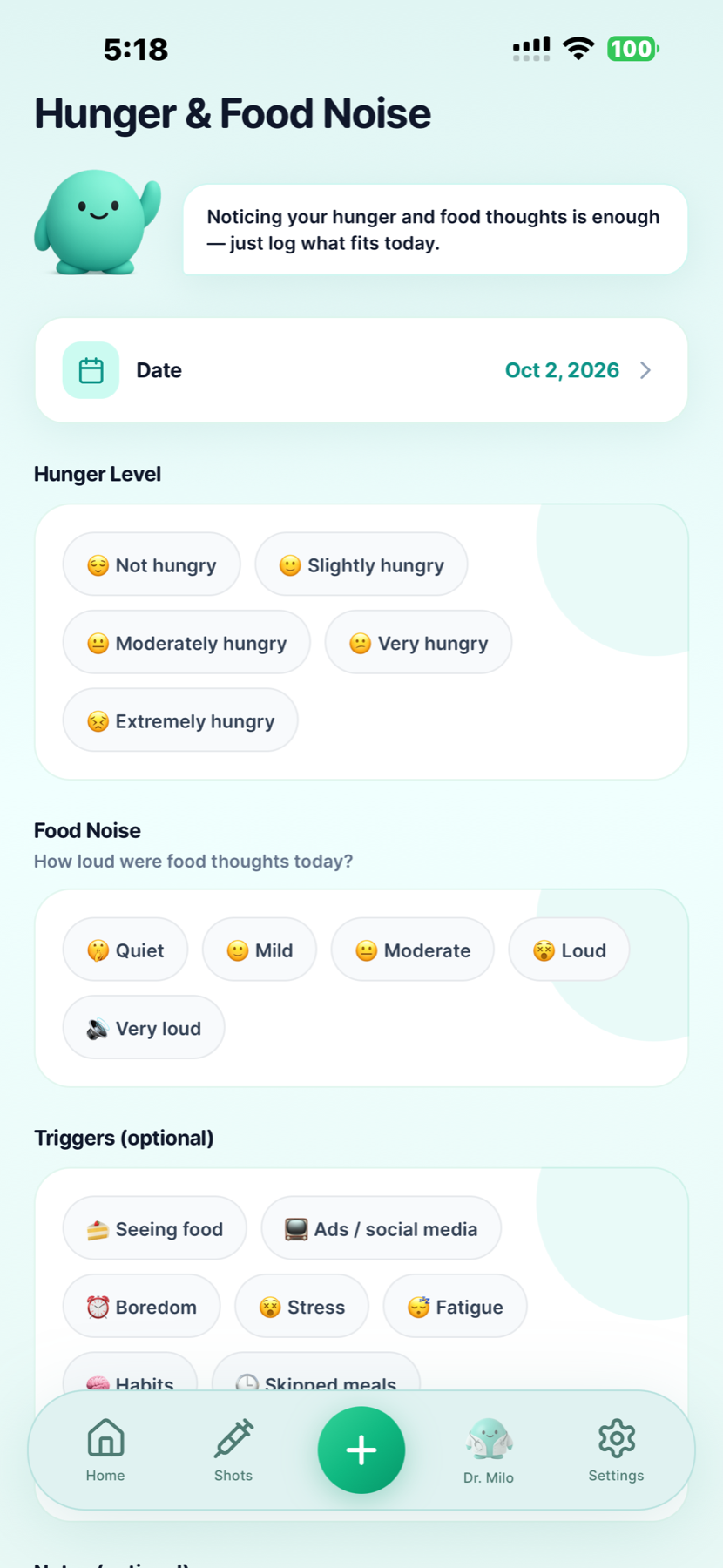
Hunger and food noise are separate entries
Record appetite and how prominent food thoughts felt on a given day. A quieter or louder day is a personal observation, not a measurement of how much medication you need.


Built by GLP-1 users · For GLP-1 users
Your next injection is one part of the week. The medication you have on hand, what you eat and how hungry you feel are part of it too.
Use GLP Buddy for your prescribed Zepbound schedule, supply records and daily check-ins. One practical journal for iPhone and Android.
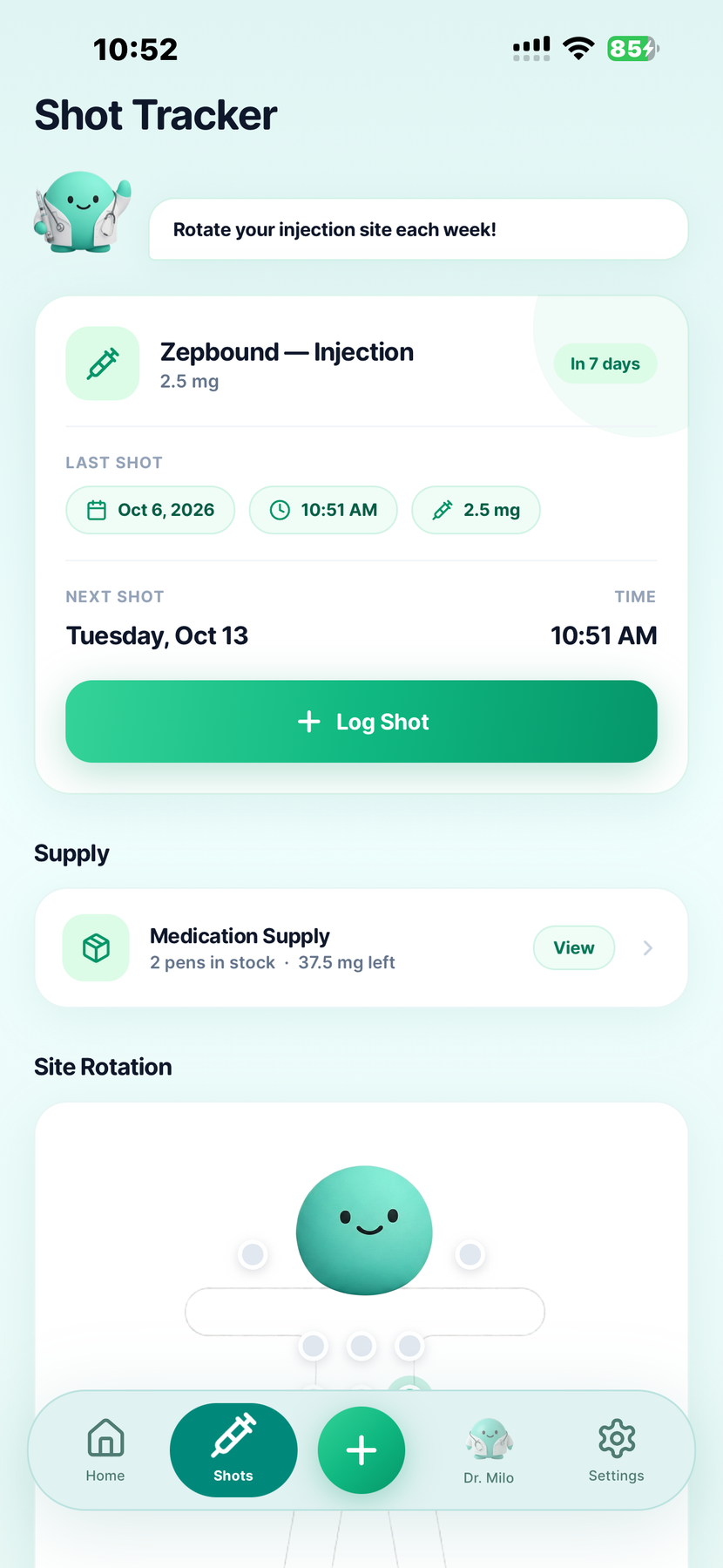
Plan, record, check in
GLP Buddy is a Zepbound tracker that brings your injection routine and everyday check-ins into one journal. Check your next scheduled shot, record the injection you took, review supply and keep food, water, hunger and symptom entries nearby.
The practical goal is to keep three things clear: what is planned, what you completed and what medication you have. None of those records should choose your dose or replace the instructions that came with your medicine.
For other injections and daily oral medications, the complete GLP-1 tracker overview explains the broader app.
Build a routine around the record
Use these as record-keeping checkpoints, not injection instructions or a missed-dose rule.
Check your prescribed schedule, the last shot you logged and your recorded site history. Match the app to your prescription rather than assuming a notification is instruction to inject.
Log the date, time, dose and injection site of the completed shot. If the injection happened at a different time from the reminder, keep the actual record accurate.
Review what you have on hand and keep supply records current. Ask your pharmacy about refills before relying on an app estimate. Logging supply does not reserve medication.
Your Zepbound supply record
Supply tracking helps organize the medication you have. It is especially worth reviewing when you receive a refill or your prescriber changes the strength you use.
The days between injections
You do not need a perfect food diary. Record the parts of a day that will be useful to look back on.
Record appetite and how prominent food thoughts felt on a given day. A quieter or louder day is a personal observation, not a measurement of how much medication you need.
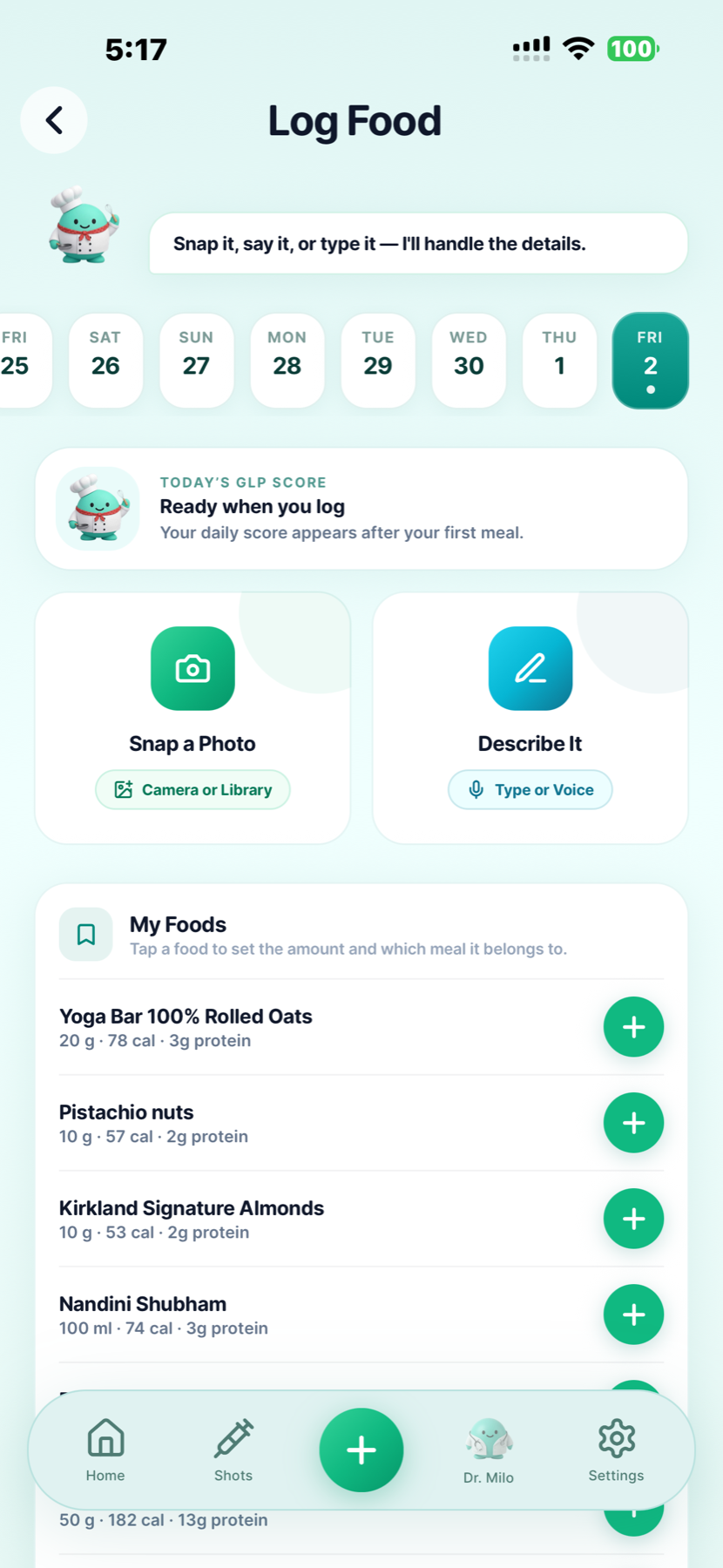
Use a photo, describe a meal in text or use voice. Keep food and water entries as everyday context. Estimated nutrition is not a replacement for a dietary plan from your care team.
Weight and symptoms can still be recorded in the same app. If a symptom concerns you, seek appropriate care first. For the details of dated symptom entries, see the side effects tracking guide .
Product instructions come first
Zepbound contains tirzepatide and is administered weekly. Its U.S. label covers weight management in eligible adults and moderate to severe obstructive sleep apnea in adults with obesity, with diet and activity changes. Read Lilly's Zepbound prescribing information.
GLP Buddy does not assess those conditions, prescribe treatment or monitor sleep apnea. It records your routine. Estimated medication curves do not measure blood levels or establish whether treatment is working.
Zepbound is an injection, not a daily pill. GLP Buddy's oral-medication records are separate. If your prescription says Mounjaro, use that brand in the app; our Mounjaro history guide focuses on reviewing records for care conversations.
Shot day, supply and daily habits
Review your next scheduled date, your last completed shot, your recorded injection site and your medication supply. Compare the app with your actual prescription and stock. A reminder or stock entry cannot decide whether you should inject.
A supply entry is a record for reviewing the medication you have. Arrange refills with your pharmacy and prescriber. Do not assume that recording stock places an order, reserves medicine or confirms that a refill will arrive.
No. Remaining stock and the dose in your prescription are different information. Use the instructions for your exact medication presentation and ask your pharmacist if the label is unclear. Do not calculate a new dose from a supply estimate.
GLP Buddy has separate hunger and food-noise check-ins. Record how hungry you felt and how prominent food thoughts were on a particular day. They describe your experience; they are not a test of medication effectiveness or a reason to change a dose.
Yes. GLP Buddy supports photo, text and voice food logging. Choose the method that fits the meal. Nutrition figures are estimates, so do not treat them as exact nutrient measurements or a prescribed eating plan.
Keep the new dose and its first injection date distinct from older records. Check your supply entries against the packaging you actually have, rather than assuming old and new stock have the same strength. Your prescriber decides the change; the app records it.
No. A Zepbound injection journal does not measure breathing during sleep, assess sleep-apnea severity or replace prescribed sleep-apnea care. GLP Buddy tracks your medication records and everyday check-ins, not this condition.
No. An inventory entry does not inspect the medicine, verify its storage history or establish that a pen or vial is safe to use. Follow the product instructions supplied with it and ask your pharmacist about any concern.
Zepbound is a tirzepatide injection, not a GLP-1 pill. Mounjaro is a separate brand containing tirzepatide. Choose your prescribed brand in GLP Buddy; support for both is not advice to switch or combine them. Daily pill tracking is a separate app feature.
Yes. Find GLP Buddy on the App Store for iPhone or Google Play for Android. Your store listing provides current pricing and terms.
Medication references checked . Product claims reflect existing GLP Buddy features and app screens. Zepbound® belongs to its trademark owner; GLP Buddy is not affiliated with or endorsed by Lilly.
Your Zepbound routine, organized in GLP Buddy.

Choose your phone's store to start your journal.