Weekly pen
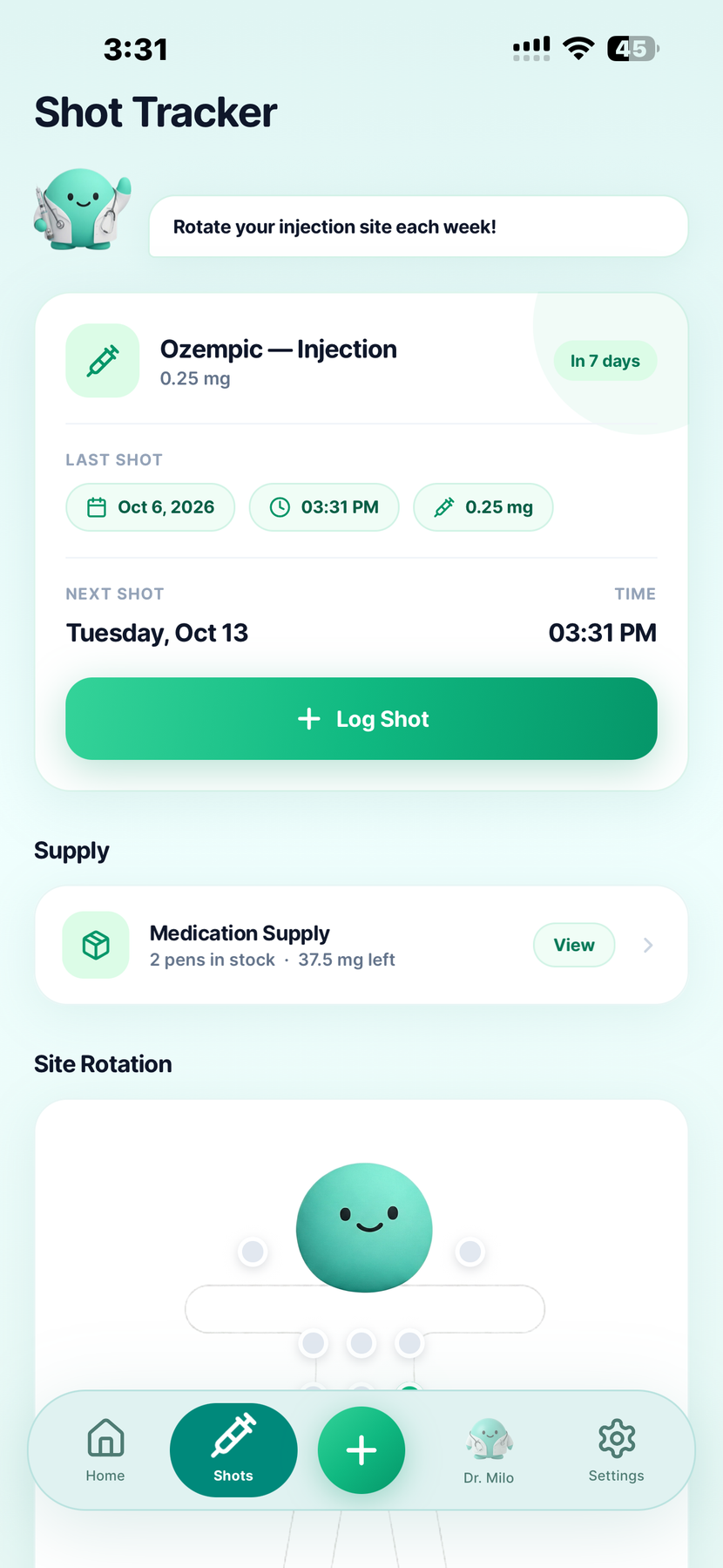
See the next scheduled shot and log a completed injection with date, time, dose and site. The site history helps you recall where you recorded the last one.
A countdown describes a plan. It cannot confirm a dose was taken.



Built by GLP-1 users · For GLP-1 users
A weekly pen or a daily pill. Your prescribed Ozempic routine deserves the right kind of record, with symptoms and progress nearby when you want to look back.
GLP Buddy tracks Ozempic injections and tablets as separate routines. Review your injection sites for the pen, or keep a daily tablet history. Available on iPhone and Android.
A clear record of the form you use
GLP Buddy is an Ozempic tracker for your prescribed injection or tablet routine. For the pen, record an actual weekly shot and review the date, dose, time and site. For the pill, keep a separate daily dose history. Add symptoms, meals, water or weight entries when those details matter to you.
In the United States, Ozempic injection and Ozempic tablets have separate prescribing information. They contain semaglutide, but the schedules and strengths differ. Choose the form on your own prescription. The app is a journal, not a way to decide which form to take.
For a broader view of other injections and GLP-1 pills, see the GLP-1 tracker overview.
Two forms, two routines
Use the record that matches the product you have, then keep the actual dose and date accurate.
See the next scheduled shot and log a completed injection with date, time, dose and site. The site history helps you recall where you recorded the last one.
A countdown describes a plan. It cannot confirm a dose was taken.
Record the tablet strength and each day you actually took it. The tablet routine has no injection site or weekly shot countdown.
Use the supplied tablet instructions for timing and administration. The app does not replace them.
The U.S. labels state that tablet strengths are not interchangeable with another formulation milligram for milligram. Any switch between a pen and a pill needs a plan from your prescriber or pharmacist. Read the tablet prescribing information.
For Ozempic injections
The shot tracker in your screenshot includes a site rotation area. Make an actual injection entry so that history remains useful when the next scheduled date appears.
Context beyond the dose
These are example GLP Buddy screens. The symptom log is a personal record; the curve is an estimate.
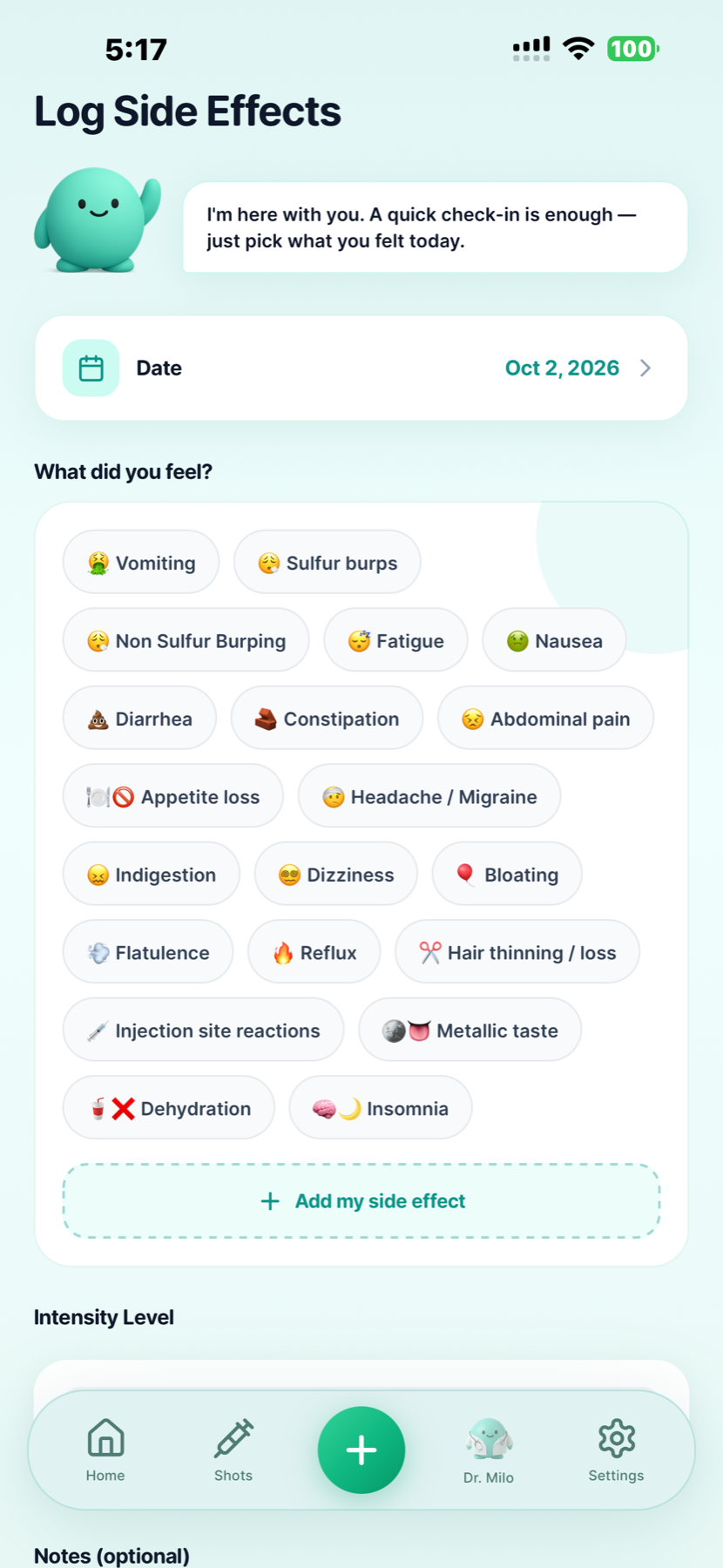
Record what you felt, its intensity and any notes. Put the entry on the day it happened so it can be reviewed alongside your medication record.
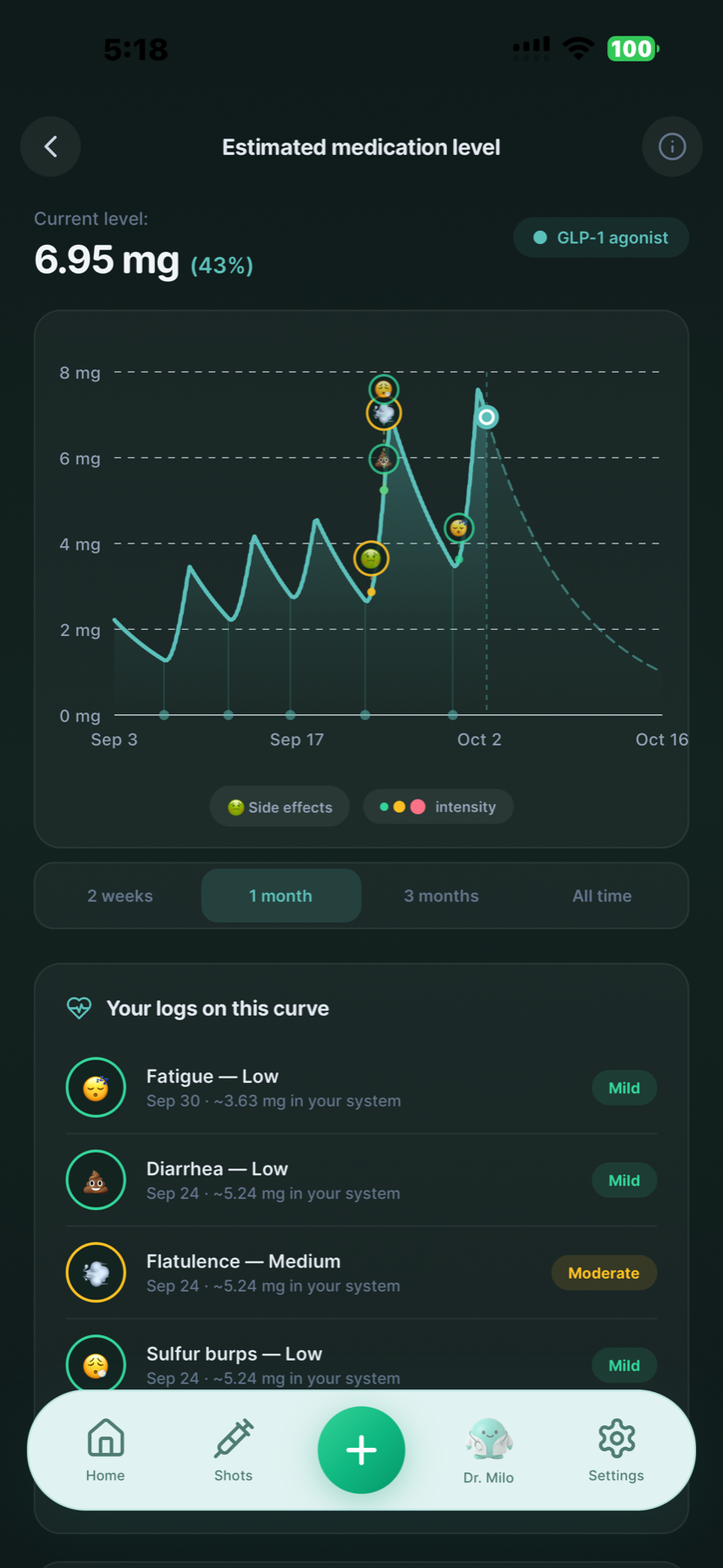
The app can display an estimated medication curve with logged symptoms. It is a model, not a measured semaglutide concentration or a reason to change treatment.
Dated entries can make a conversation with your care team more specific. They cannot establish that a medicine caused a symptom or predict your individual response. Learn more about recording GLP-1 side effects .
A journal alongside care
Ozempic is a semaglutide medicine used for specific type 2 diabetes indications in the United States. The U.S. injection and tablet labels describe different approved uses and instructions. This page explains the GLP Buddy record, not who qualifies for treatment. Read the injection label and the tablet label.
GLP Buddy does not measure blood glucose, A1C, kidney function or cardiovascular risk. Your weight chart, symptom notes and estimated medication curve cannot replace tests or monitoring from your healthcare team. If you also use insulin or another diabetes medicine, ask your clinician about your own monitoring plan.
Ozempic pen, pill and app questions
Yes. Choose the form you have been prescribed. GLP Buddy keeps weekly injection entries and daily tablet entries as different routines. The screenshot on this page shows the injection view, not a tablet screen.
Record the injection you actually took, including its date, time, dose and site. You can review the last logged shot and the next scheduled date. A scheduled reminder is not proof that an injection happened.
Yes. GLP Buddy shows your recorded site history in the shot tracker so you can check where you logged previous injections. Follow the injection training and instructions for your own product; the app does not choose a safe site for you.
Use the daily tablet routine and record the strength and actual date taken. Tablet entries do not use the weekly shot countdown or an injection site. Follow the instructions supplied with your prescription for how and when to take it.
No. The Ozempic injection and tablets have different formulations and schedules. Do not convert a tablet entry into an injection dose, or switch products based on a number in the app. Ask your prescriber or pharmacist for any transition plan.
Yes. Add a dated symptom entry with intensity and notes if useful. You can review it alongside your medication history. A nearby date does not prove Ozempic caused the symptom, and a concerning symptom needs medical advice.
No. GLP Buddy shows an estimate based on recorded medication information, not a blood test or a personal clinical measurement. Do not use the curve to change your dose or decide whether treatment is working.
No. Medication, weight and wellness records do not replace glucose measurements, A1C tests, kidney monitoring or other care recommended for type 2 diabetes. Follow your healthcare team’s monitoring plan.
Keep the app record accurate, but use the instructions for your exact pen or tablet and contact your care team when you are unsure. The weekly injection planner is only a calendar view for an existing routine; it cannot decide a missed-dose or switching plan.
GLP Buddy is available on iPhone and Android through the official store buttons on this page. Check your phone’s store listing for current pricing, trial availability and included features.
Medication references checked . Product details reflect GLP Buddy's existing features and the owner's app screenshot. Ozempic® belongs to its trademark owner; GLP Buddy is not affiliated with or endorsed by Novo Nordisk.
Your prescribed Ozempic routine, organized in GLP Buddy.

Choose the store for your phone.